
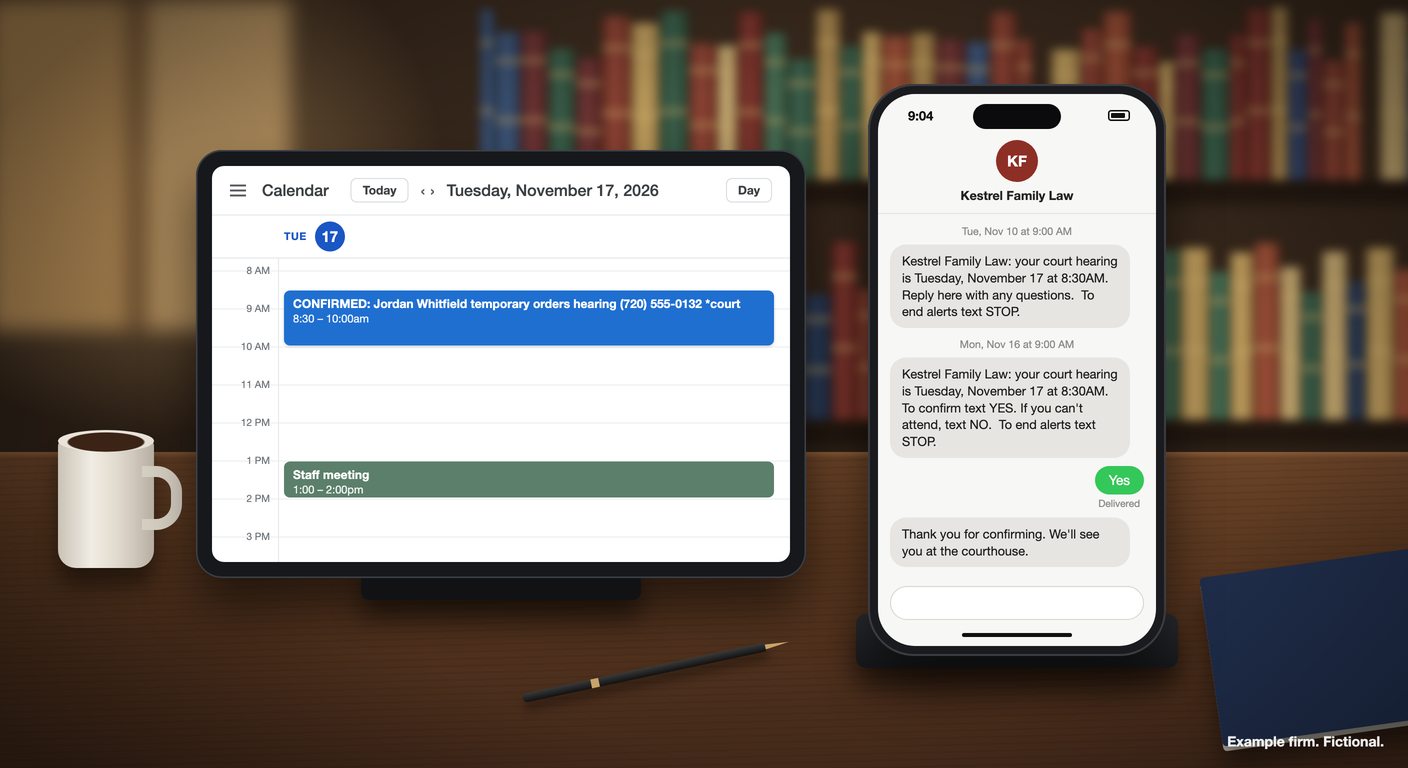
With Clientping, a hearing on your firm's calendar sends the client two texts. Staff add *court to the event title next to the client's mobile number. A week before the hearing, the client gets a short heads-up from your firm's own number. The day before, they get a reminder that asks them to text YES, and when they do, the event on your calendar is retitled CONFIRMED:. Questions a client writes back appear in the firm's inbox, where staff answer them. Firms often ask how to send automated appointment reminders and case updates via text, and a court date is the case update clients most need to receive on time. A custom message and one of Clientping's reminder rules handle it without changing how your office books anything.
Both texts come from the same number. Each starts with the firm's name, gives the hearing's day and time from your calendar, and asks for one thing. Here's the week-out text from the example below:
Kestrel Family Law: your court hearing is Tuesday, November 17 at 8:30AM. Reply here with any questions. To end alerts text STOP.
It doesn't ask for YES, and that's deliberate. A week out, the client needs the date and a way to ask about it. The confirmation comes the day before, when an answer tells you something about tomorrow morning:
Kestrel Family Law: your court hearing is Tuesday, November 17 at 8:30AM. To confirm text YES. If you can't attend, text NO. To end alerts text STOP.
The client answers "Yes", and Clientping sends the firm's reply:
Thank you for confirming. We'll see you at the courthouse.
Clientping reads YES as a whole word in upper or lower case, so "yes", "YES" and "Yes!" all count. Short forms like "Y", "OK" or "yep" don't confirm, which is why the text spells out the word to send. The firm writes the wording, up to 231 characters per message, and Clientping adds the opt-out line to every reminder and custom message.
The calendar does the reporting. When the day-before reminder goes out, the title changes from your staff's wording to REMINDED: ..., and the reply moves it to CONFIRMED: ... or DECLINED: .... On Monday, staff can open Tuesday's calendar and see which hearings are confirmed without logging in to anything. The week-out text leaves the title alone, so in this setup the hearing's prefix follows the day-before reminder and the client's answer to it.
DECLINED: on a hearing means the client answered NO, not that anything changed with the court, and it's the firm's cue to call. The client gets "Thank you. We will give you a call.", and the address set for email notifications on that calendar receives a "Client declined" email naming the client's number, the event and its date and time. Until someone calls, the client may assume a NO settled things, so call the same day. We recommend leaving rescheduling off on court reminders, since a client can't move a hearing by text.
Clients also write back with questions, such as which courtroom it is. With the calendar's email notifications on, a reply to the day-before reminder that says more than YES or NO arrives as a "Client Message" email with a link to answer it. Every reply, including answers to the week-out text, sits in the two-way inbox under the client's number, and staff answer from the firm's number. HELP and INFO get an automatic response instead and don't email staff. A reply after the week-out text can be associated with another reminder for that number, so its email can follow that calendar's notification settings, and a YES or NO can confirm or decline another upcoming appointment if its reminder asks for confirmation. When Clientping can't associate the reply with an eligible reminder, it emails the reply only if email notifications for incoming texts are on, and they're off by default. If your week-out text invites questions, as Kestrel's does, turn both kinds of notification on and keep an eye on the inbox for clients with several appointments.
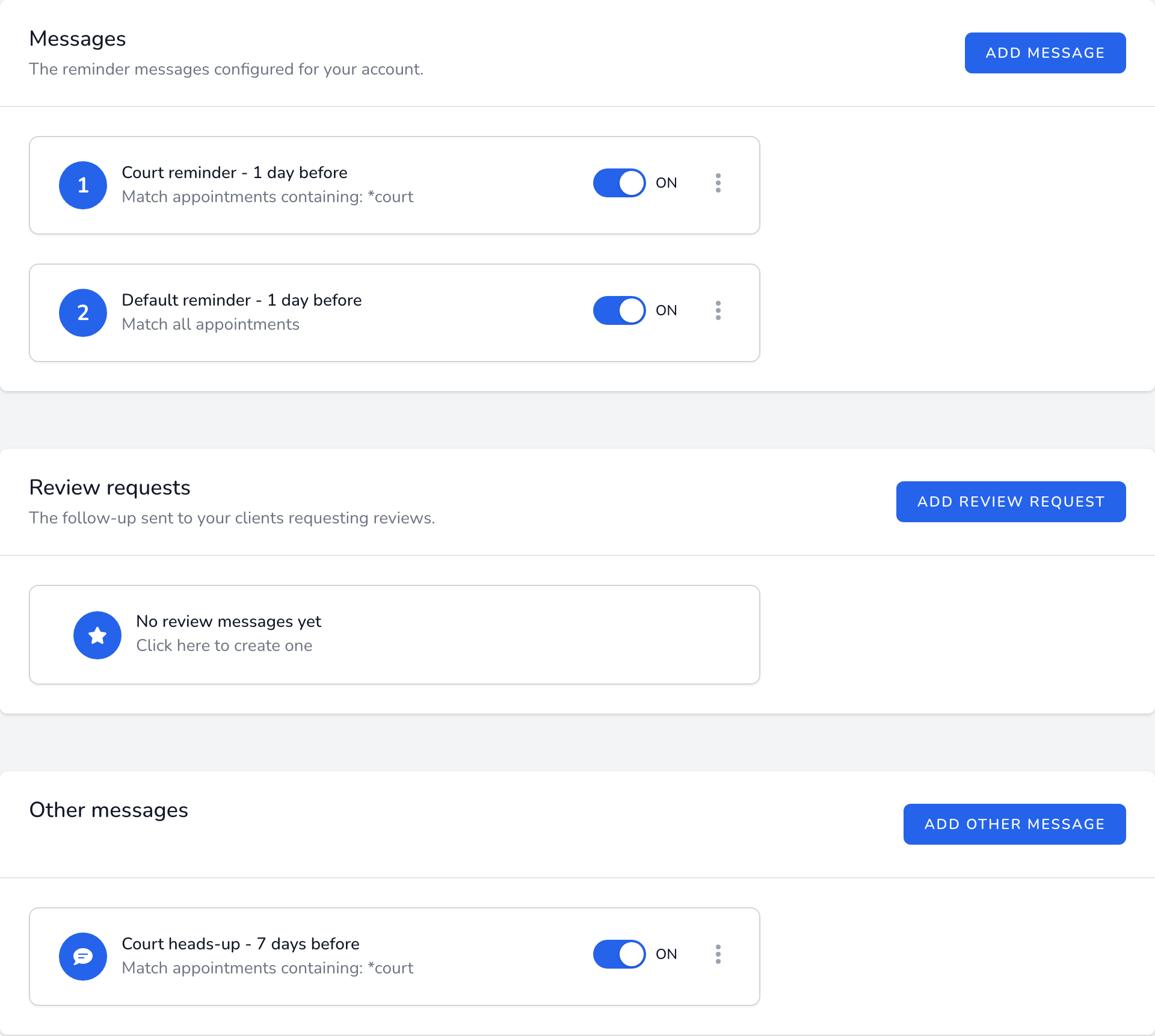
Kestrel Family Law is a fictional family-law practice in Denver, on Mountain time. Its calendar has three rules: the default reminder for office appointments, the custom "Court heads-up" message 7 days before, and the "Court reminder" rule 1 day before. Clientping checks calendars every hour on the hour from 10 a.m. to 6 p.m. Central, which is 9 a.m. to 5 p.m. in Denver.
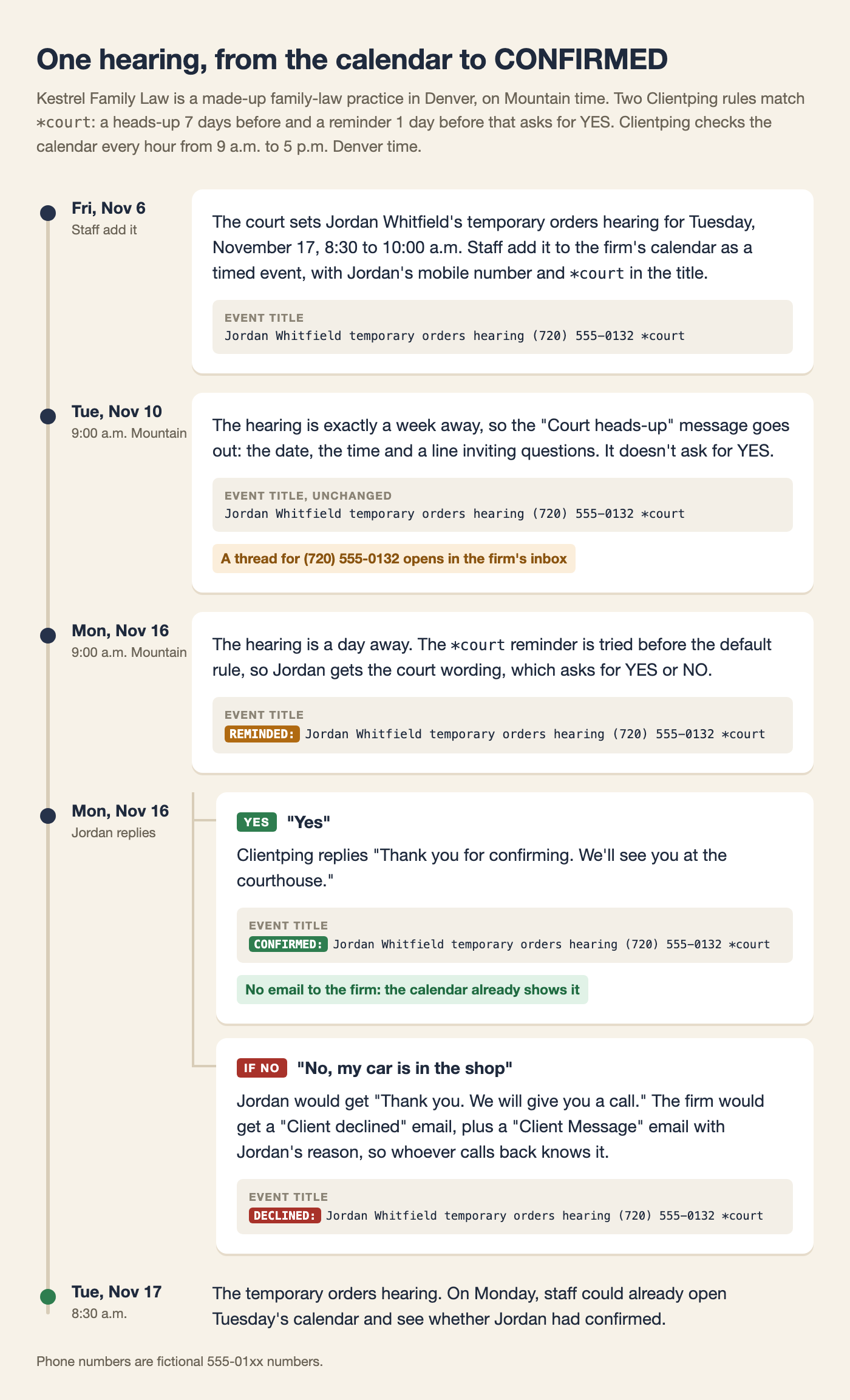
On Friday, November 6, 2026, the court sets a temporary orders hearing for client Jordan Whitfield on Tuesday, November 17, from 8:30 to 10:00 a.m. Jordan agreed at intake to receive texts from the firm, so staff add it as a timed event titled Jordan Whitfield temporary orders hearing (720) 555-0132 *court.
On Tuesday, November 10, at the first check of the day (9:00 a.m. Mountain), the hearing is exactly a week away and matches the "Court heads-up" message. Jordan's phone receives the week-out text, 130 characters in one segment:
Kestrel Family Law: your court hearing is Tuesday, November 17 at 8:30AM. Reply here with any questions. To end alerts text STOP.
The calendar title doesn't change, and a thread for (720) 555-0132 opens in the firm's inbox.
On Monday, November 16, at 9:00 a.m. Mountain, the hearing is a day away. The *court reminder is tried before the default rule, so Jordan gets the court wording, 150 characters in one segment:
Kestrel Family Law: your court hearing is Tuesday, November 17 at 8:30AM. To confirm text YES. If you can't attend, text NO. To end alerts text STOP.
In the same check, the event becomes REMINDED: Jordan Whitfield temporary orders hearing (720) 555-0132 *court. Jordan replies "Yes" and receives:
Thank you for confirming. We'll see you at the courthouse.
The event becomes CONFIRMED: Jordan Whitfield temporary orders hearing (720) 555-0132 *court. A plain YES needs no follow-up, so no email goes out.
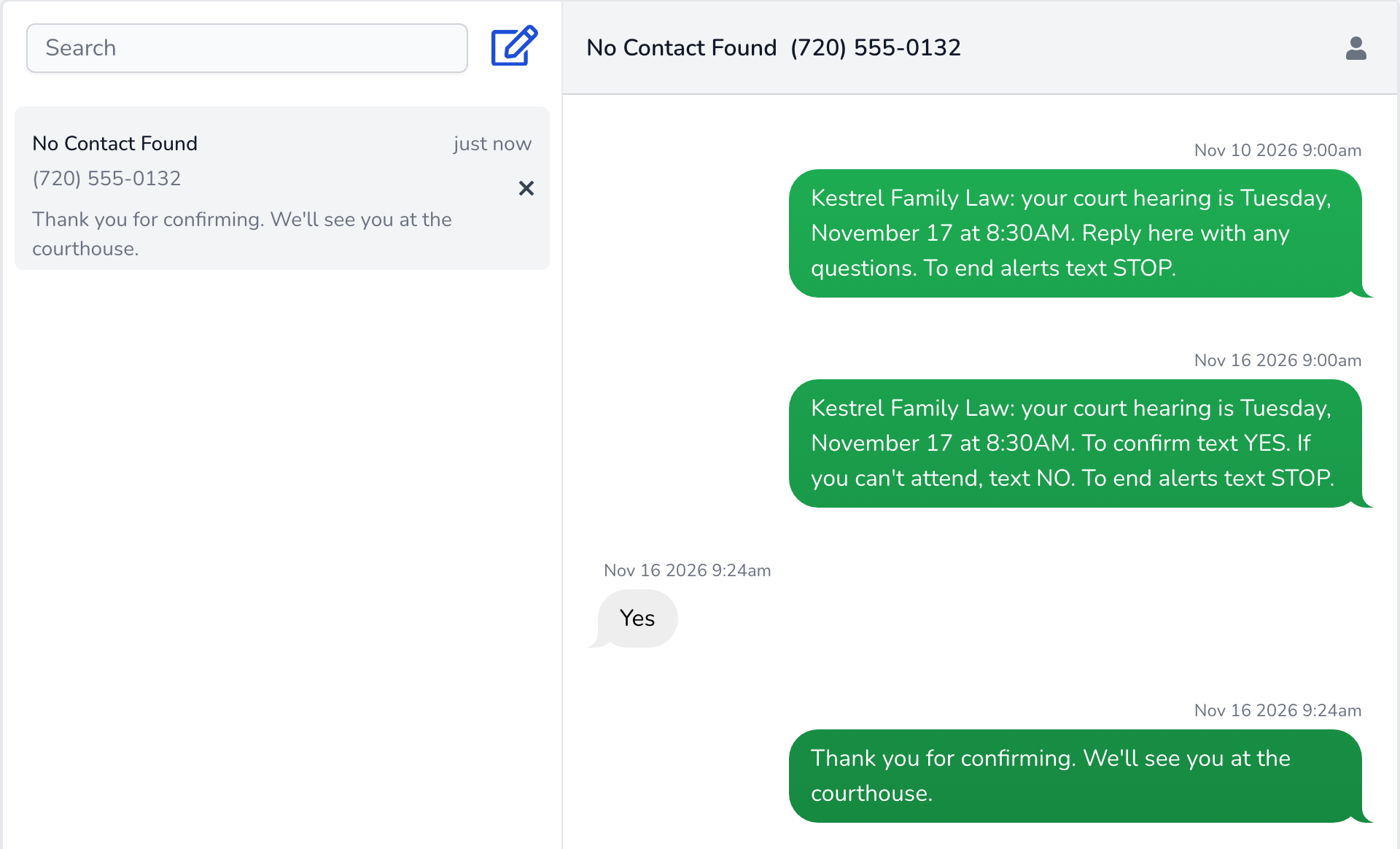
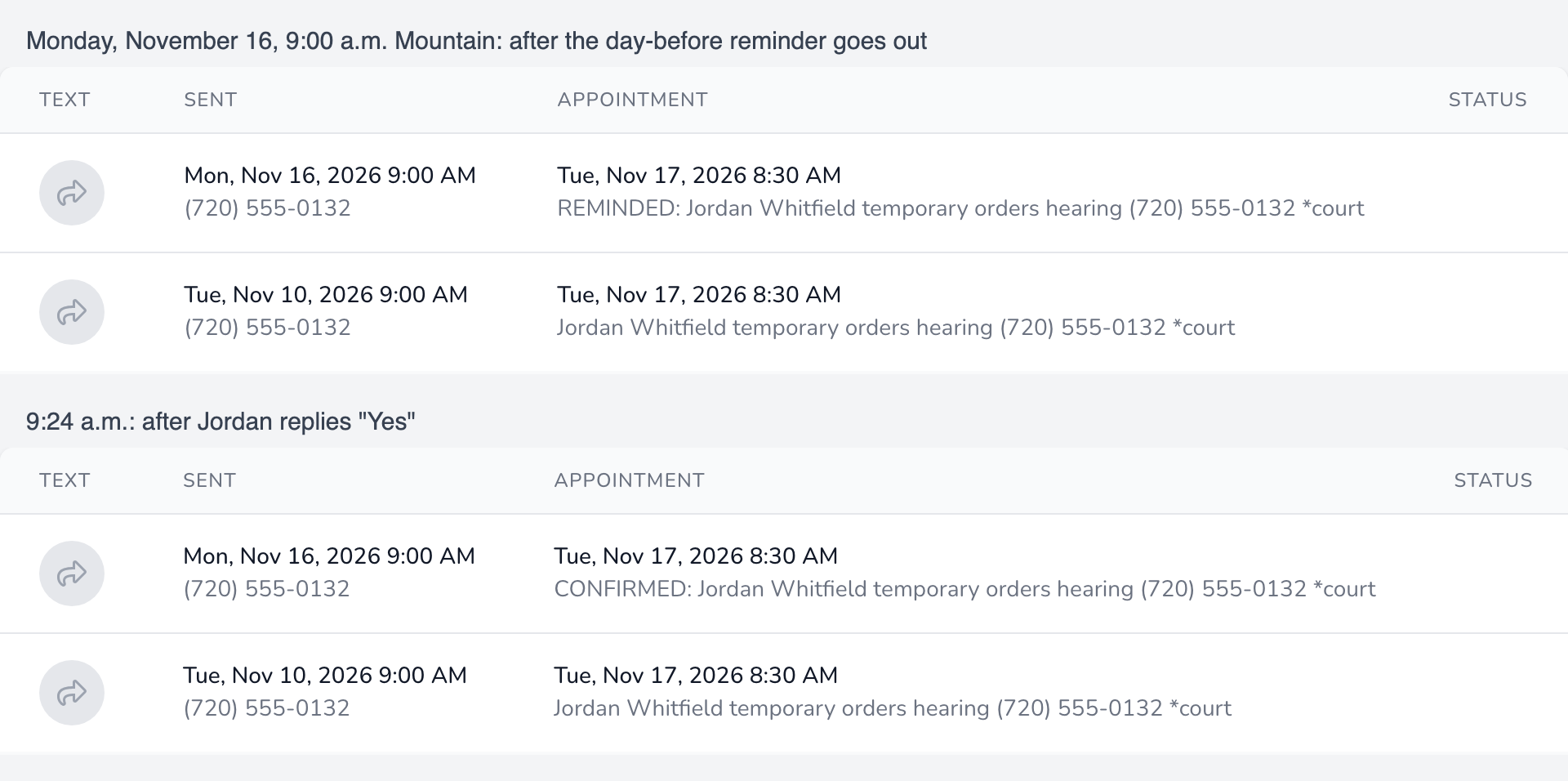
Had Jordan written "No, my car is in the shop", the reply would have been "Thank you. We will give you a call.", the title would have become DECLINED: ..., and Kestrel's notification address would have received a "Client declined" email. Because that answer says more than NO, a "Client Message" email with a reply link would have arrived too, so whoever calls Jordan back knows the reason.
The week-out text is a custom message that only matches appointments containing *court, set to 7 days before. The day-before text is a reminder rule matching *court, set to 1 day before, with "Confirm appointment" on and "Allow clients to reschedule" off. Leave "Update calendar title", "Reply to YES" and "Reply to NO" on with the reply wording shown above, and keep email notifications on for the calendar with the right address, since the title changes, replies and emails depend on those settings. Keep the firm's default reminder for consults and office meetings on the same 1-day-before schedule. Within each day, rules with match text are tried first, so a hearing gets the court wording and not the default text as well. A default reminder set for a different day would send the hearing an extra text and can make the day-before reminder ask for YES2.
Using a custom message for the week-out text is deliberate. Confirmation belongs on one reminder day per calendar, and in this setup that's the day-before reminder. Because a custom message carries no YES or NO and doesn't touch the title, the day-before text can ask for a plain YES that's simple for the client to answer.
The asterisk matters too. Rules match the event title as plain text, ignoring case, so a bare court rule would also fire on "Courtney Hale" or "courtesy call". *court only matches where staff typed it, and it goes in the title, because rules created in the editor search the title only. The asterisk is literal text, not a wildcard. Mediations and depositions can follow the same pattern with their own keyword, such as *mediation, on the same two days.
The setup works the same way on Google Calendar and Outlook, reading the number and keyword from the title. On Clio, the text goes to the primary phone of the client on the linked matter, so the hearing entry needs a matter whose client has a mobile number as primary phone. Our page on Google Calendar, Outlook or Clio covers each calendar.
Add a client's number only after they've agreed to receive texts from the firm. Hearings have to be timed events, because Clientping skips all-day events. By default it also skips events organized by someone other than the calendar's owner, such as an accepted invitation, unless "Only process events created by the calendar owner" is unchecked in calendar settings. Each message is picked up on its scheduled day, so a hearing added five days out never gets the week-out message, though it still gets the day-before reminder, and a hearing typed in after the last check on the day before (6 p.m. Central, 5 p.m. in Denver) gets neither. A message that's already queued can go out later than planned if sending is delayed and retried. If the same client has another confirming appointment that day on the same calendar, one of the two day-before texts usually asks for YES2 instead, and the client answers with what the text shows. Appointments on different calendars are numbered separately, so when a client has both, staff should check which appointment a reply confirmed.
For family and criminal clients who share a phone with someone else, "your court hearing" may reveal more than the client wants others to see, and so can a firm name like Kestrel Family Law. It helps to ask at intake whether anyone else reads texts on that number. For those clients, a firm can give hearings a neutral keyword and wording such as "your appointment on [date]", and keep the court text for everyone else. Clientping doesn't read dockets or e-filing notices, so a hearing has to be on the calendar for the texts to go out. For the wider picture, we've written about what reminder software has to do for a law firm.
Clientping plans start at $49 a month for 600 messages and 4 calendars. New firms get a 7-day free trial, and you'll enter a US card to begin. When the trial ends, your card is charged for the plan you chose unless you cancel before then on the Billing page. To see it on your own phone, add the two *court rules, then, before 6 p.m. Central, put a timed event exactly 7 days out on your calendar with your mobile number and *court in the title. The heads-up is scheduled for the next check that day and the reminder for six days later, though processing or retries can delay sending.