
Updated October 2026
Tomorrow's consults are already on the calendar. Someone at the front desk spends the afternoon calling down the list, and a client still forgets now and then, leaving the attorney an empty hour. So you're looking for software that takes that afternoon off your staff's plate. (We've put a dollar figure on missed consults in another post.)
Here's what it has to do for a law firm: read the calendar you already keep, text each client the day before, and put the client's YES or NO back on the appointment where your staff will see it. ClientPing connects to Clio, Google Calendar and Outlook or Microsoft 365 and does those three things. The rest of this post shows how each part works, then follows one two-client signing at a made-up firm.
ClientPing doesn't keep a calendar of its own, so nobody enters an appointment twice. It watches yours. On Google Calendar and Outlook, the client's cell number goes in the event title, in any common US format with the area code. ClientPing reads the title only, never the description, and every number in the title gets its own text. On Clio, nobody types a number. ClientPing follows the entry to its linked matter and texts the primary phone of the client on that matter. Our walkthrough of Clio text reminders covers the details.
ClientPing checks each calendar every hour, on the hour, from 10 a.m. to 6 p.m. Central. It skips all-day and cancelled events.
Each calendar also has an "Only process events created by the calendar owner" box, checked by default. If staff book from their own accounts and invite the attorney, or several people share one firm calendar, uncheck it in calendar settings so those appointments get reminders too.
If you run practice management software, Clio connects directly. Any other system works only if it puts appointments on a Google or Outlook calendar with the client's cell number in the event title. Intake is the same story. ClientPing isn't intake software, but it reminds from whatever calendar entry your intake process creates.
When the text goes out, ClientPing puts REMINDED: in front of the event title. A client who answers YES gets "Your appointment is confirmed!" and the title switches to CONFIRMED:. Capitalization doesn't matter, but YES has to be a whole word, so "yesterday" won't count. "Sí" counts as a yes too. A NO gets "Thank you. We will give you a call.", the title switches to DECLINED:, and with the default settings the appointment details are emailed to the calendar's notification address so someone can call back.
Any reply with more in it, from "should we bring the old deed?" to "yes, see you then", gets emailed to you as well. A client who texts STOP is opted out of your firm's texts, and ClientPing never reads STOP as a yes or a no. If a client asks you to stop in their own words, like "please don't text me", that reply lands in your email rather than opting them out automatically, so block the client in ClientPing right away.
Texts come from a dedicated number in the area code you choose, and calls to it can forward to your front desk. Staff answer questions from the two-way inbox, and that's also where you'd send a one-off "your documents are ready" text. ClientPing doesn't send case updates on its own.
Larkspur Hollow Law is a made-up three-attorney estate planning firm that keeps its schedule in Outlook. It hasn't touched ClientPing's default rule: one reminder the day before, confirmation on, calendar titles updated.
On Monday, October 19, 2026, the office manager books Ruth and Sam Okafor to sign their wills on Thursday, October 22 at 10:00 a.m. Each gave a cell number at intake, so she types both into the title:
Okafor will signing (312) 555-0131 (312) 555-0164
On Wednesday, October 21, at one of the hourly checks, ClientPing finds two numbers in that title and sends two texts. Ruth and Sam each get this:
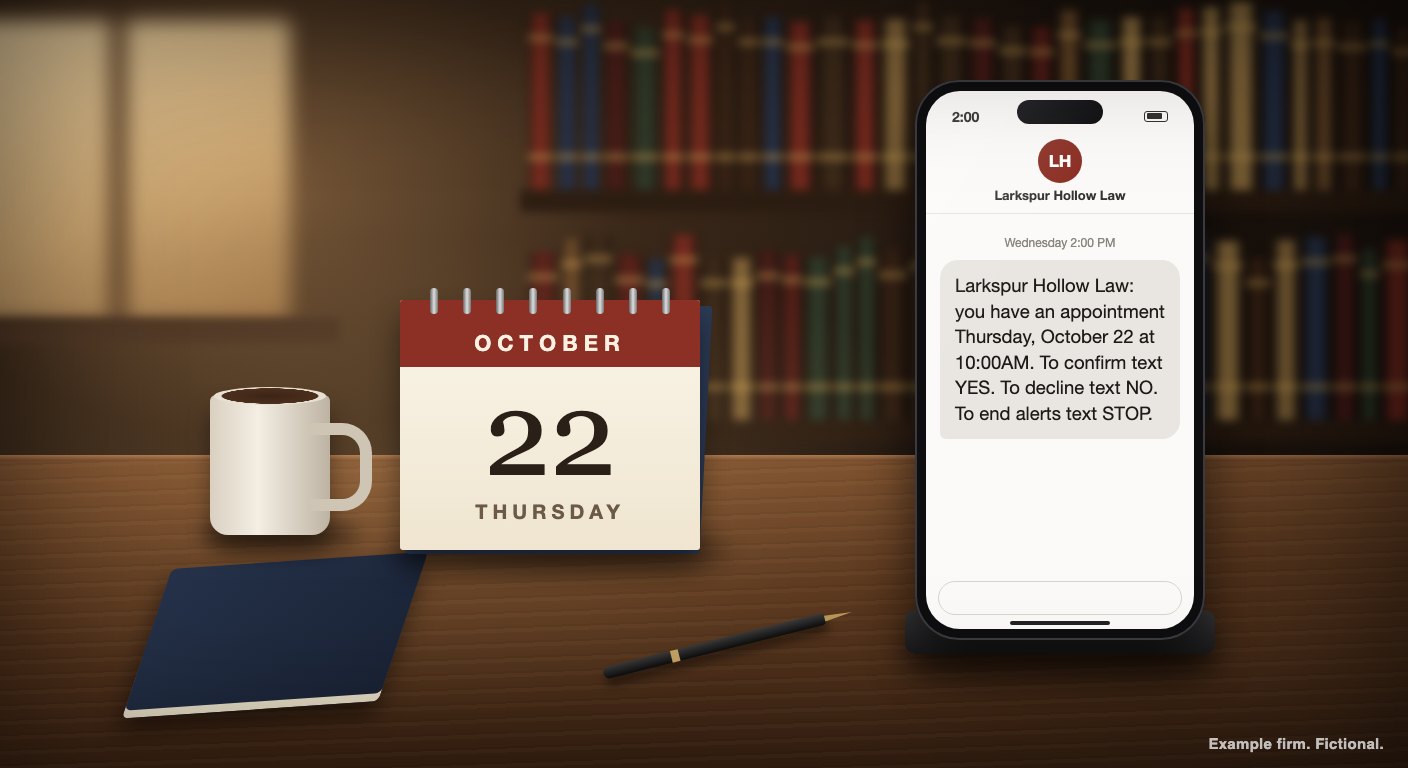
Larkspur Hollow Law: you have an appointment Thursday, October 22 at 10:00AM. To confirm text YES. To decline text NO. To end alerts text STOP.
Spacing in the example message is normalized for readability.
The Outlook event now reads REMINDED: Okafor will signing (312) 555-0131 (312) 555-0164.
Ruth replies "Yes" and gets "Your appointment is confirmed!" back. The title still says REMINDED:, because Sam hasn't answered, and ClientPing won't mark a joint appointment confirmed on one person's word.
That evening Sam replies "yes, see you then". He gets the same confirmation, and now that both numbers have said YES, the title becomes ALL CONFIRMED: Okafor will signing (312) 555-0131 (312) 555-0164. Because Sam's reply had words beyond the YES, the firm also gets an email with his message. Ruth's plain "Yes" didn't trigger one.
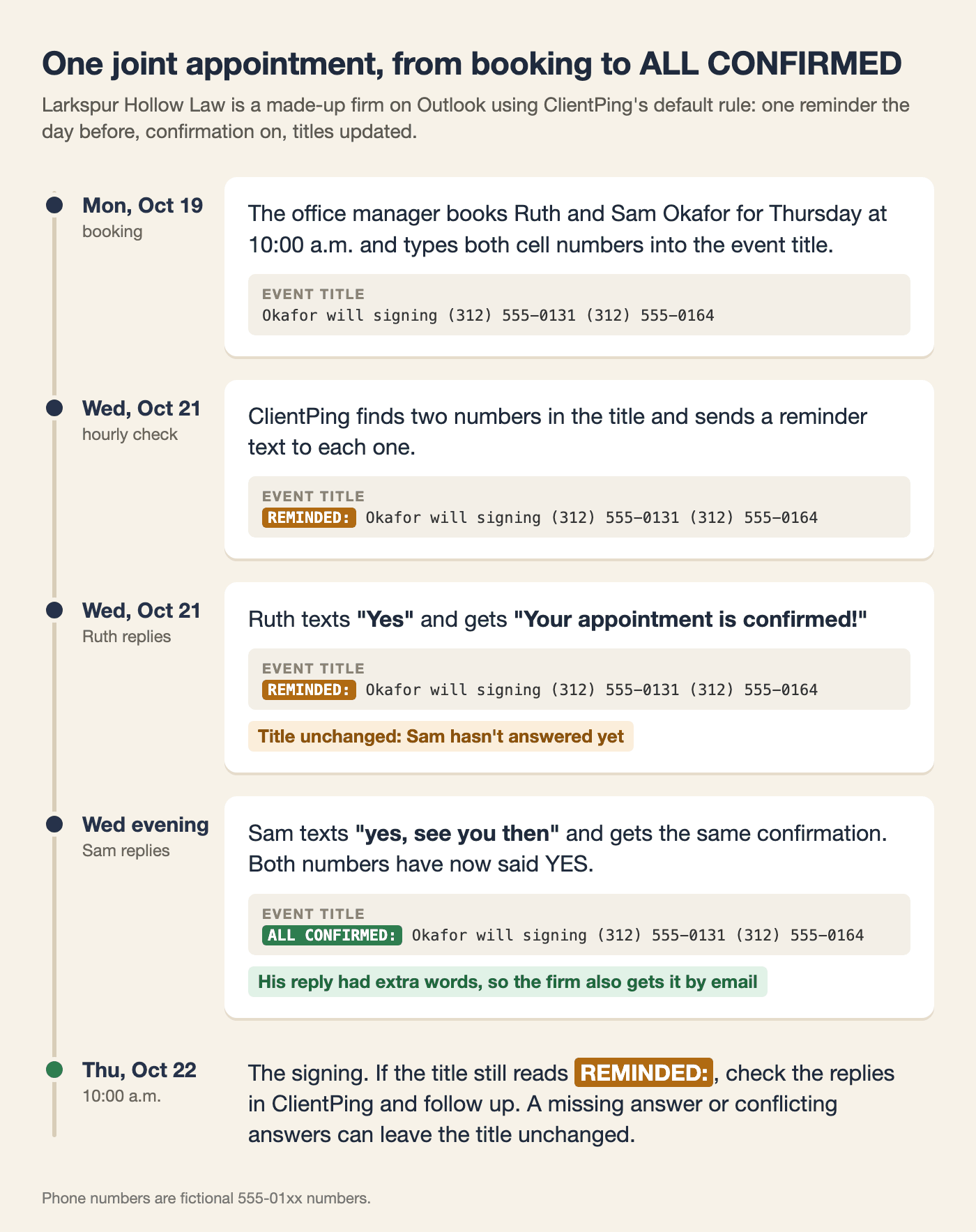
The title also tells you when something's off. If Sam had said NO, the title would have stayed at REMINDED:, and with the default settings the firm would have gotten the decline email. If a joint appointment still reads REMINDED: on the morning of the signing, check the replies in ClientPing and follow up. A missing answer or conflicting answers can leave the title unchanged. For a single client, our Outlook text reminders walkthrough follows one consult from phone call to YES.
The default message carries your firm's name, the date and time, and the YES, NO and STOP instructions. It says nothing about the matter, the attorney or the reason for the visit. Larkspur Hollow's "will signing" stays in the Outlook title.
You control the wording, up to 231 characters per message field, and the reminder messages page shows how to edit it. Keep case details out. If your firm's full name says more than a client would want a housemate to see, use a shorter form clients will still recognize, such as "Larkspur Hollow" instead of "Larkspur Hollow Divorce & Custody". Every text still has to tell the client who sent it.
Vonage carries ClientPing's texts and receives the phone number and the message content, and the client's mobile carrier delivers them. Replies we forward to you by email go through SendGrid. Our privacy policy (effective October 5, 2026) lists each of them.
Before the first reminder goes out, get each client's agreement to appointment texts. Ask on your intake form or in the engagement letter which cell number the client wants them sent to. That puts the agreement in writing, and it matters when a shared family phone could tell someone else that the client has hired a lawyer.
For an earlier heads-up on single-client appointments, add a second rule set to 4 days before. Reminders can go anywhere from 1 to 31 days ahead, never the same day. Confirmation can only be on for one reminder day per calendar, so leave it off on the 4-day rule. The day-before text may then ask for a numbered reply such as YES2 or NO2, and clients should answer with exactly what it shows. Keep joint appointments on the single default reminder for now: adding an earlier reminder can leave their title at REMINDED: even after everyone confirms.
A hearing usually needs different wording than a consult. Create a rule set to 1 day before that matches *court, have staff add *court to hearing titles, and those events get the court message instead of the default one for that day.
To let a client who says NO pick a new time, turn on client rescheduling, which needs your available hours set and a [rebook] placeholder in the reply to NO. The link skips any slot already busy on your calendar, and it only goes out on appointments with one number, so the Okafors wouldn't get it. If you turn on rescheduling for a calendar with joint appointments, check those replies in ClientPing: a plain NO from a joint appointment currently sends neither a reschedule link nor a decline email.
New clients can book a first consult from a booking link you share. And a review request can go out a set number of days after the appointment, skipped for anyone who declined. Make sure your clients' consent covers that text too, and think twice before sending one after a divorce or a criminal matter.
Plans start at $49 a month for 4 calendars and 600 messages. New firms get a 7-day free trial. You'll need a US card to sign up, and when the 7 days end your card is charged for the plan you picked unless you cancel before then on the Billing page.
To test it, connect your calendar and create an event for tomorrow with your cell number in the title (on Clio, link the entry to a matter whose client has your cell as the primary phone). Do it before 6 p.m. Central, while there's still an hourly check left today.