
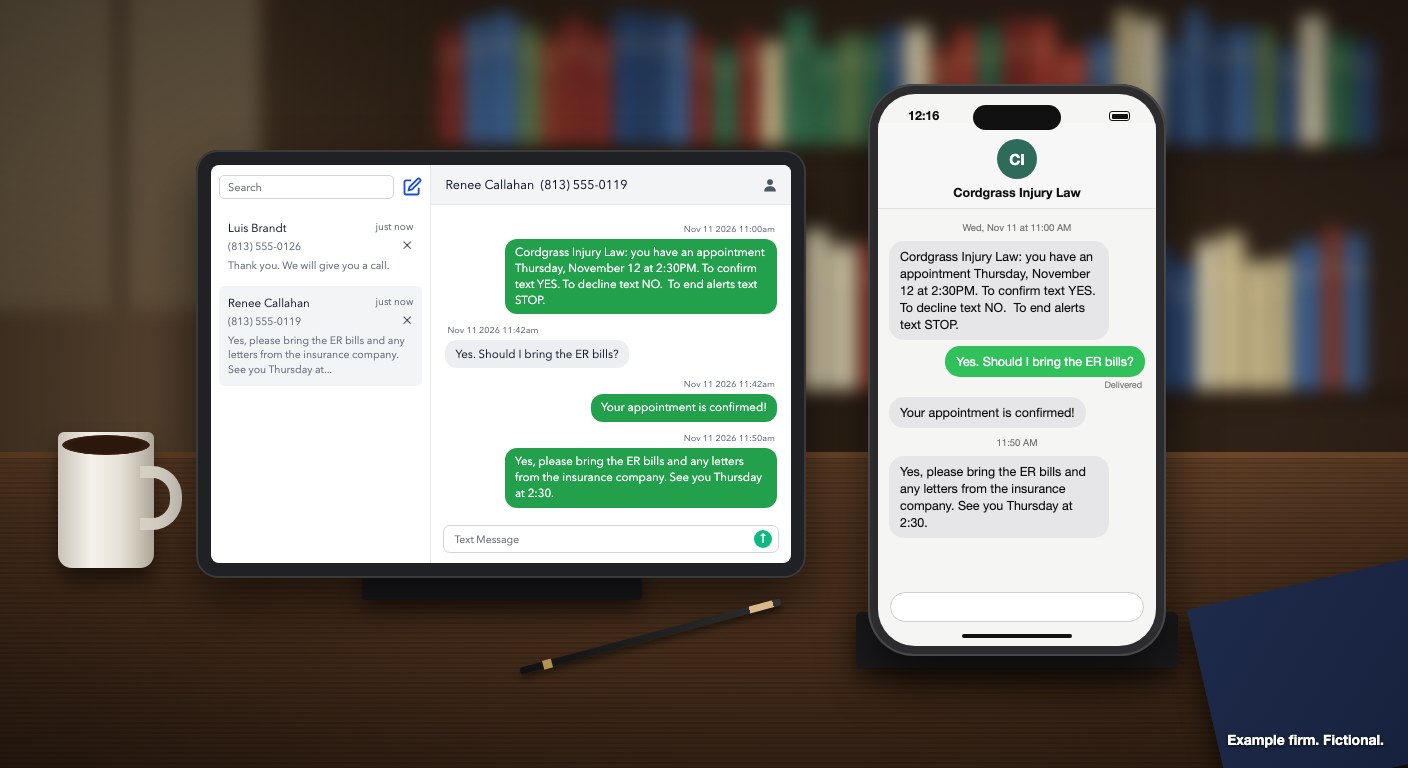
Every Clientping reminder comes from your firm's own number, so when a client writes back, the reply reaches the firm rather than a no-reply address. Before the appointment, a YES or NO updates it on your calendar by itself. A reply to a recent reminder that says anything more goes by email to whoever handles that calendar, so a person reads it and can answer or call. Reminders and client conversations sit in Messages, one thread per client, where staff reply from the same number the reminder came from.
Here's how the most common replies work with the default reminder on a calendar and one client per appointment:
| The client texts | The calendar event | The client gets | The firm gets by email |
|---|---|---|---|
| A bare YES or NO | Retitled CONFIRMED: or DECLINED: |
The firm's YES or NO reply | Nothing for YES; "Client declined" for NO |
| YES with anything else, even "Yes!" | Retitled CONFIRMED: |
The firm's YES reply | "Client Message" with the full text |
| A question or other text without YES or NO, such as "Can we make it later?", that Clientping matches to a reminder for an appointment that's coming up or started in the last 32 days | Unchanged | Nothing automatic | "Client Message" with the full text |
| A text Clientping can't match to such a reminder | Unchanged | Nothing automatic | "Client Text", only if "New text message notifications" is on |
| HELP, STOP or START | Unchanged | A confirmation when STOP or START changes their status; a short HELP reply, limited to one per client and 50 across the firm a day | Not for HELP; STOP and START follow the Profile setting |
YES and NO act only before the appointment starts. When an appointment has more than one client number, the title becomes ALL CONFIRMED: only when everyone confirms, or ALL DECLINED: only when everyone declines (see reminder messages). Clientping matches each reply to a reminder it has already sent that client, using the reply code in the text, so when a client has more than one recent reminder, check which appointment the email names.
The "Client Message" email goes to the calendar's "Notification email", quotes the client's words and ends with a "Reply here" link. The fourth row is easy to miss: that text waits in Messages with a green unread dot, and "New text message notifications" in Profile starts out off. We recommend turning it on. HELP gets a short reply, limited to one per client and 50 across the firm a day, but doesn't mark a thread unread or email anyone, while STOP and START appear in the client's thread like any other text, so staff can see why texts have stopped.
That setting matters even more if you send a week-out heads-up that invites questions. Clientping doesn't match replies to that custom message, but a question about it can be matched to another recent reminder for the same client and follow that calendar's email settings. If Clientping can't match it, the Profile setting decides whether you get an email.
Messages lists threads newest first. Each shows the client's name when the number matches one of your synced contacts, or "No Contact Found" when it doesn't, and the search box finds a thread by number, contact name or the last message. The screen refreshes itself every 10 seconds. Staff type in the "Text Message" box at the bottom of the thread, and the client sees the answer in the same conversation as their reminder.
From a "Client Message" or "Client Text" email, staff can answer without logging in: the "Reply here" link opens that one conversation, with its history and a reply box, for 7 days. The page takes replies up to 640 characters, so write anything longer in Messages. Anyone holding the email can use the link, so send these emails to a staff inbox and don't forward them outside the firm.
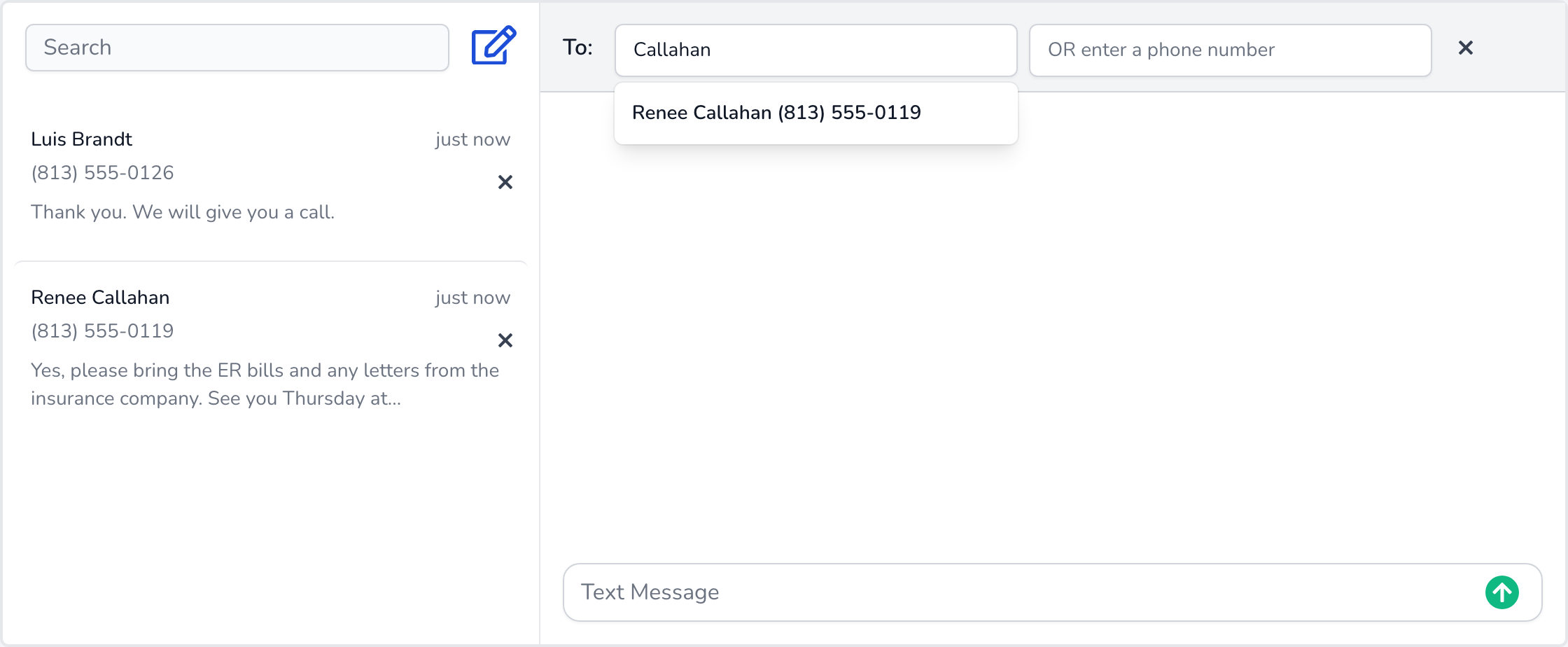
To start a conversation, the pencil icon ("New message") opens a "To:" line where staff search their contacts by name or type a number into "OR enter a phone number". One habit matters here: Clientping adds no firm name or opt-out line to a message staff type. That's right in a running thread, where the client already knows who's writing. A new conversation should go only to someone who's agreed to receive texts from the firm, and it should open with the firm's name, as Cordgrass's does below. If they've never had a text from you, end it with "Reply STOP to opt out."
When a client has texted STOP, the thread says so: "This client texted STOP and has opted out of texts. Texts to this number are not sent until they reply START." Nothing staff send reaches that client until the client does. In Messages, each attempt is marked "Not sent: client opted out (STOP)", and the email reply page shows an error saying the message wasn't sent.
Cordgrass Injury Law is a made-up two-attorney personal-injury firm in Tampa, Florida. Its calendar runs Clientping's unchanged default reminder, one day before with confirmation on. The intake paralegal's address is the "Notification email" both on the calendar and in Profile, "New text message notifications" is on, and both clients below are saved as contacts. On Thursday, 12 November 2026, staff have two case reviews on the calendar: Luis Brandt case review (813) 555-0126 at 10:00 a.m. and Renee Callahan case review (813) 555-0119 at 2:30 p.m., Eastern.
Clientping checks calendars hourly from 10 a.m. to 6 p.m. Central, which is 11 a.m. to 7 p.m. in Tampa. At the first check on Wednesday, 11 November, Renee's phone receives this, from the firm's Clientping number, (813) 555-0170:
Cordgrass Injury Law: you have an appointment Thursday, November 12 at 2:30PM. To confirm text YES. To decline text NO. To end alerts text STOP.
Luis gets the same text for 10:00AM. Both events are retitled REMINDED: ..., and a thread for each client appears in Messages, already marked read because the firm sent the first text.
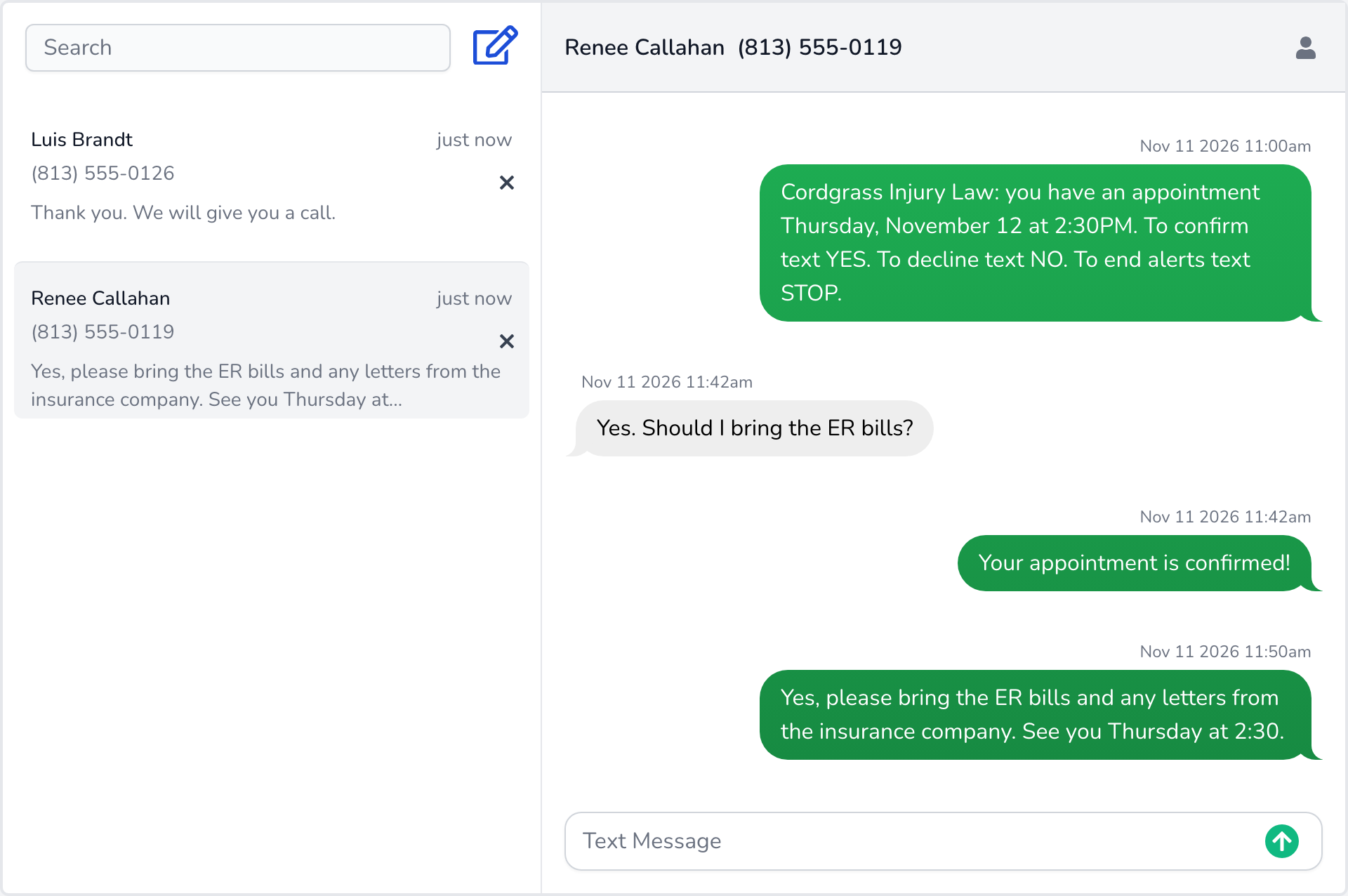
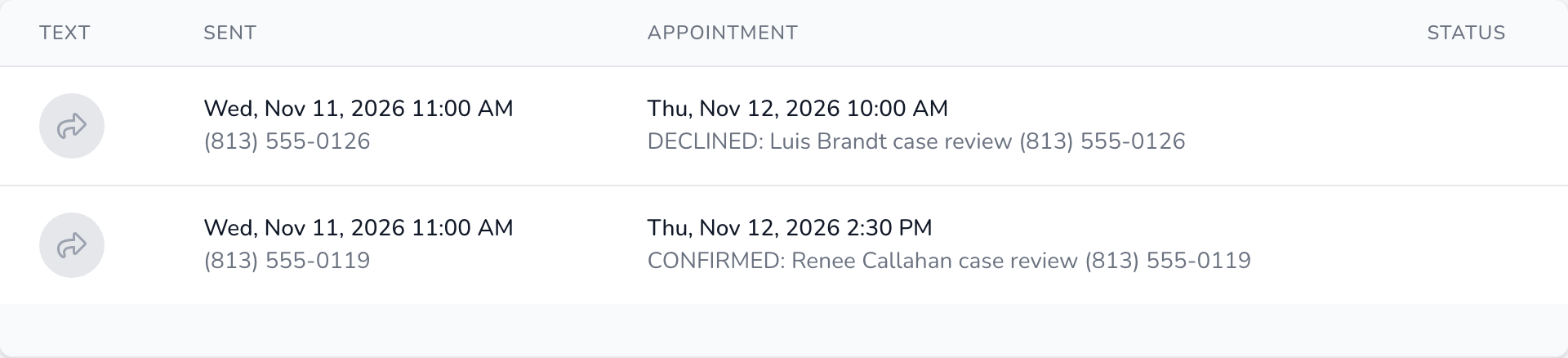
At 11:42 a.m. Renee replies "Yes. Should I bring the ER bills?" Clientping reads the YES, retitles her event CONFIRMED: Renee Callahan case review (813) 555-0119 and texts her "Your appointment is confirmed!" Because her reply says more than YES, her thread gets a green dot and the paralegal receives a "Client Message" email with Renee's question and a "Reply here" link.
At 11:50 the paralegal taps the link on her phone and answers, with no login:
Yes, please bring the ER bills and any letters from the insurance company. See you Thursday at 2:30.
Renee receives it below the reminder in the same conversation, and her thread in Messages now shows all four texts.
This is the "Client Message" email the paralegal received, exactly as Clientping sent it apart from the shortened link. It names the event by its title when her text arrived:
Subject: Client Message
A client replied to "REMINDED: Renee Callahan case review (813) 555-0119" (18135550119) with something other than YES or NO:
Yes. Should I bring the ER bills?
Reply here: https://clientping.com/text/b1f8b414-...?t=...
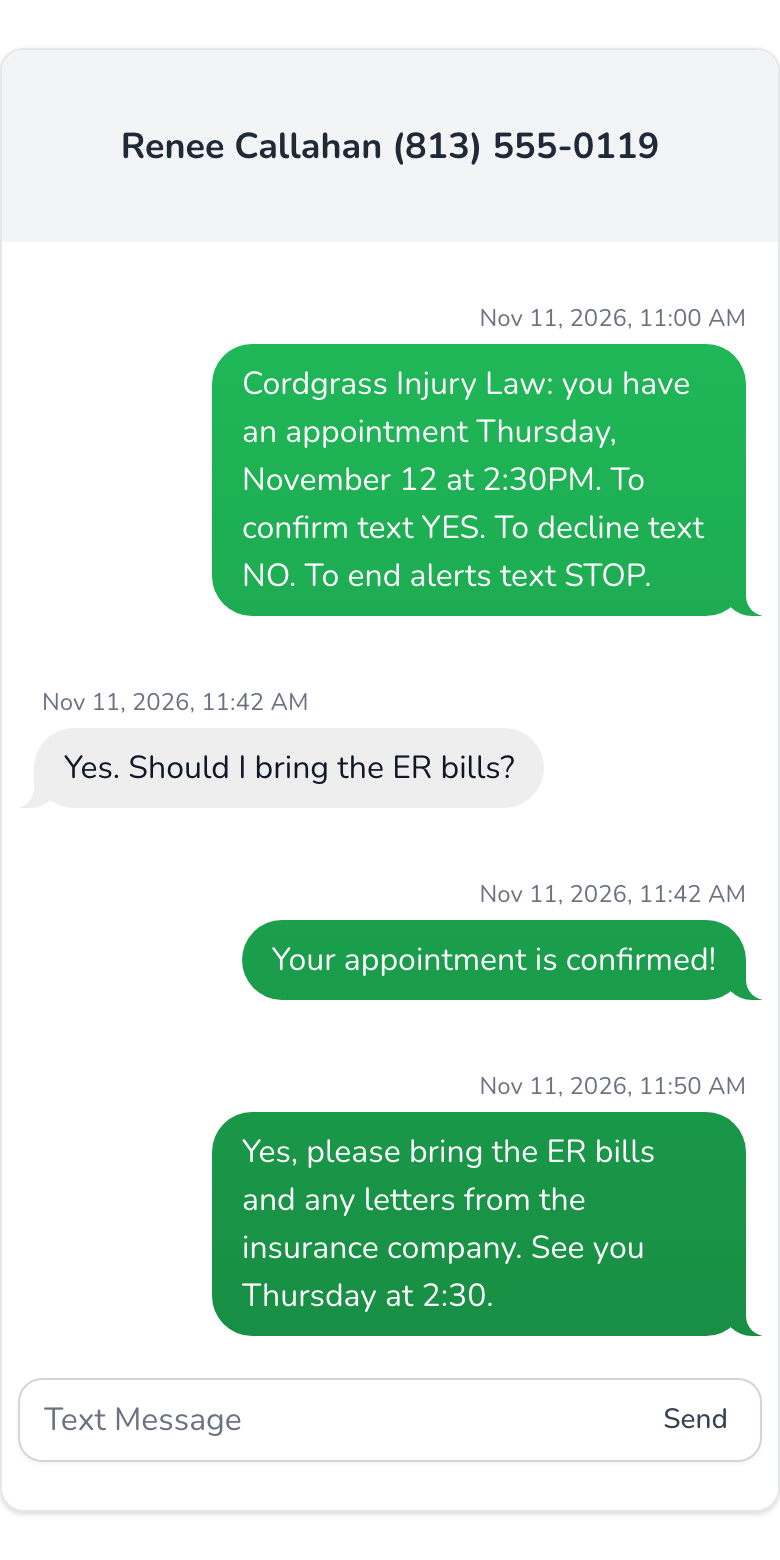
At 12:15 p.m. Luis replies "NO". His event becomes DECLINED: Luis Brandt case review (813) 555-0126, he's texted "Thank you. We will give you a call.", and the paralegal gets a "Client declined" email naming his number and the appointment. She calls him that afternoon to find a new time.
On Monday, 30 November, 18 days later, Renee texts "Hi, the adjuster called me today. Should I call him back?" Her reminder's appointment started less than 32 days earlier, so it arrives as a "Client Message" email and the calendar doesn't change. Sent on Tuesday, 15 December, more than 32 days on, the same text wouldn't match and would wait in Messages with a green dot, and the paralegal would get a "Client Text" email only because "New text message notifications" is on.
When staff later need a signature, they tap the pencil icon, search "Callahan" and send:
Cordgrass Injury Law: your records release form is ready to sign. Stop by any weekday 9 to 5, or reply here with a time that suits you.
Clientping confirms on YES and declines on NO, so "Ok" or "Y" confirms nothing, which is why the default reminder spells out the word to send. Clients don't always answer in one word, though: Renee asked a question with her YES, and another client may explain why they can't come. When a reply to a recent reminder says more, a person gets it by email in the client's own words and can answer by text or phone. The calendar title tells you what Clientping understood, and the email tells you what the client meant.
The inbox works the same on Google Calendar, Outlook or Clio (setup for Google Calendar, Outlook and Clio). On Clio, reminders go to the primary phone of the linked matter's client. One number serves every calendar on the account, while each calendar sends its emails to its own "Notification email", so replies about intake appointments can reach the intake paralegal. Texts Clientping can't match to a recent reminder go to the single address in Profile. Some reminders carry a numbered code such as YES2, and clients answer with the code their text shows. Texts in both directions count toward your plan's monthly messages, as shown on pricing. Add a client's number only after they've agreed to receive texts from the firm.
In Profile, under "Edit Messaging Settings", save the address under "Notification email", then flip the "Turn on new message notifications" switch so it reads "New text message notifications enabled". Next, check the "Notification email" for each calendar under Calendars. Text your firm's Clientping number from your own phone, watch the thread appear in Messages and answer it. Your reminder rules decide what the first text says.